Your speakers are ready, but the receiver runs out of connections before the game console is plugged in. A home theater receiver has to match the equipment you own and the speaker layout you want. Buying more channels or a bigger wattage number alone will not solve every setup problem.
Flanner’s Home Entertainment can help you work through the connections before you bring new equipment home. This guide covers speaker channels, video formats, power, and room correction in everyday terms. You can use it to choose a receiver around your system instead of paying for features you will not use.
Match the Receiver to Your System
Explore receivers at Flanner’s Home Entertainment and get local help planning speaker connections, video sources, and professional installation.
Key Takeaways
- Count the speakers: Choose channels for your planned speaker layout, including any height speakers, rather than room size alone.
- Check each input: Confirm the video formats supported by the specific inputs you will use for consoles and other sources.
- Match the equipment: Speaker compatibility and listening needs matter alongside the advertised power rating.
- Plan the setup: Room correction can help adjust the system, but it does not replace sensible speaker placement.
What a Home Theater Receiver Does
A home theater receiver, also called an AV receiver, powers your speakers, decodes surround sound formats like Dolby Atmos and DTS:X, switches between video sources, and often streams music. It connects your TV, streaming devices, game consoles, and Blu-ray players, sending video to your display and sound to your speakers.
How Many Channels Do You Need?
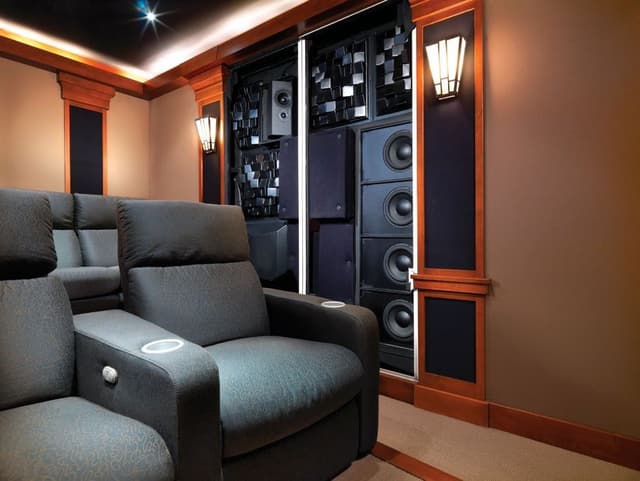
Receiver channels are described with numbers like 5.1, 7.2, or 9.4:
Choose Channels for Your Speaker Layout
- The first number is the number of main speakers.
- The second number is the number of subwoofer outputs.
- A third number, such as 5.1.2, indicates height speakers for Dolby Atmos.
Quick room guide:
- Five main speakers: Start with a receiver that supports those channels and your planned subwoofer connections.
- Height speakers: Check the receiver’s supported layout and amplified channels for the Atmos setup you want.
- Expanded layouts: Confirm the processing and amplification required for every speaker, including any external amplifier.
Check the number of powered amplifier channels, not just the output labels, before committing to an Atmos speaker layout.
Home Theater Receiver Comparison by Channel Count and Features
| Tier | Channels | Atmos Support | HDMI 2.1 Inputs | Room Correction | Streaming | Ideal Room Size | Price Tier |
|---|---|---|---|---|---|---|---|
| Entry | 5.2 | Varies by model | Limited | Basic | Yes | Small | Budget |
| Mid | 7.2 | Yes | Several | Advanced on many models | Yes | Medium | Mid |
| Advanced | 9.4 | Yes | Several | Advanced | Yes | Large | Upper |
| Flagship | 11.4 and up | Yes | Most | Advanced, often Dirac Live | Yes | Dedicated theaters | Premium |
Power, Speakers, and Room Size
Power ratings describe output under stated test conditions, so compare those conditions as well as the number. Speaker sensitivity, impedance, room size, and listening level affect what your system needs. Match the receiver’s supported speaker loads to the speakers’ specifications.
Preamp outputs let you add external amplifiers later for even more power. This is a great feature if you plan to upgrade your speakers over time.
Home Theater Receiver Pros and Cons by Channel Count
Choosing a higher channel count home theater receiver opens the door to immersive Atmos layouts, but it isn't necessary for every room.
Pros
More layout options:
Additional powered channels can accommodate more surround or height speakers when the receiver supports your intended configuration.
Planned expansion:
Choosing capacity for a specific later speaker addition can help you avoid replacing the receiver just to support that layout.
Flexible channel assignment:
Some receivers let you assign available channels to different uses, but the manual determines which combinations can operate together.
Cons
System cost:
Extra channels are most useful when your budget also covers the speakers, wiring, and installation needed to use them.
More setup work:
A larger speaker layout requires suitable placement and calibration; channel count alone does not improve the sound.
Video and Gaming Features
Modern receivers must keep up with today's TVs and game consoles:
- HDMI 2.1: Check which inputs and outputs support features such as 4K at 120 Hz or 8K passthrough. Capabilities vary by receiver and port.
- VRR (Variable Refresh Rate): Reduces screen tearing in games.
- ALLM (Auto Low Latency Mode): Automatically minimizes input lag for gaming.
- HDMI eARC: Sends high quality audio from your TV to the receiver.
Count the inputs that actually support the video formats your consoles or other devices use. Some receivers offer high-bandwidth passthrough on only a subset of their HDMI inputs.
Room Correction and Streaming
Room correction systems measure your room's acoustics and adjust the sound for better balance:
- Audyssey: Common on Marantz and other receivers.
- Dirac Live: An advanced room correction system available on select models.
- YPAO: Yamaha's room correction system.
Streaming features like HEOS, AirPlay, Chromecast, and Spotify Connect let you play music throughout your home. Multi zone audio lets you send music to other rooms.
Choosing a Receiver Brand and Budget
- Yamaha: Known for dependable performance, strong value, and YPAO room correction.
- Marantz: Known for warm, musical sound and HEOS streaming.
- Sony ES: Known for premium performance and 8K ready features.
- Integra: Known for custom installation features and advanced room correction.
- McIntosh: Known for iconic design and luxury performance.
Professional setup and calibration help you get the most from any receiver.
Home Theater Receivers at Flanner's
Compare these home theater receivers to find the right fit for your system. Use the category links to browse receivers, then check the specifications for each model.
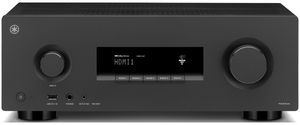
Yamaha 5.2 Channel 8K Home Theater AV Receiver (RX300A)
The Yamaha RX300A is listed as a 5.2-channel 8K home theater receiver, giving you a starting point for a system with five main speaker channels. The two subwoofer outputs provide connection options, but adding subwoofers does not automatically improve the sound without suitable placement and setup. Compare the exact input support with your TV and video sources before buying. This receiver is worth considering when your planned layout fits its channel count and you would rather focus the budget on the system you need now.
Top Features
- 5.2 channel configuration: Plan for five main speaker channels and up to two subwoofer connections; follow the receiver’s connection guide.
- 8K video support: Check what the model accepts and what it puts on screen; those specs can differ.
- Dual subwoofer outputs: Plan space for your subwoofer and check the receiver’s supported connections.
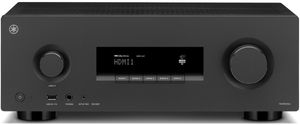
Yamaha 7.2 Channel 8K Home Theater AV Receiver (RX500A)
The Yamaha RX500A is listed with 7.2 channels and 8K video support, offering more main speaker channels than the 5.2-channel option. That extra flexibility is useful only if it matches the layout you intend to build, so decide where the speakers will go before choosing the receiver. Review the exact supported surround formats and video inputs instead of relying on the headline specifications. This option gives you another Yamaha comparison for a growing system, with the final choice depending on connections, compatibility, and your listening plans.
Top Features
- 7.2 channel configuration: Check how each piece connects and which orientation fits your layout.
- 8K video support: Check what the model accepts and what it puts on screen; those specs can differ.
- Room for system growth: Measure the space you have before comparing it with larger models.
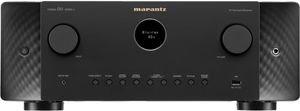
Marantz CINEMA Series 7.2 Channel AV Receiver with Dolby Atmos and HEOS (Cinema 60)
The Marantz CINEMA 60 combines a 7.2-channel layout with Dolby Atmos support and HEOS streaming. That makes it a candidate for a system used for both movie sound and music, rather than only one type of listening. The available speaker configuration still needs to match the receiver’s capabilities, particularly if you plan to add height speakers. Compare its connections with the TV, sources, and speakers you already own, then review how HEOS fits your music routine before treating streaming features as a reason to upgrade.
Top Features
- 7.2 channel configuration: Check how each piece connects and which orientation fits your layout.
- Dolby Atmos support: Check which speaker layouts and input formats the model supports.
- HEOS streaming: Check whether it supports the devices and services you already use.
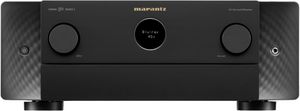
Marantz CINEMA Series 9.4 Channel AV Receiver with Dolby Atmos and HEOS (Cinema 50)
The Marantz CINEMA 50 offers 9.4 channels, Dolby Atmos support, and HEOS streaming. Its larger channel count gives you more speaker-layout options than the CINEMA 60, while four subwoofer outputs provide additional connection flexibility. More outputs are not a reason to buy extra speakers you do not need, so start with a realistic room plan. Compare this model if you want a more involved surround setup, and review placement, calibration, and source compatibility as part of the budget rather than considering the receiver price alone.
Top Features
- 9.4 channel configuration: Check how each piece connects and which orientation fits your layout.
- Four subwoofer outputs: Plan space for your subwoofer and check the receiver’s supported connections.
- Dolby Atmos support: Check which speaker layouts and input formats the model supports.
- HEOS streaming: Check whether it supports the devices and services you already use.
Sony ES Premium 9.2 CH 8K A/V Receiver (STR-AZ3000ES)
The Sony STR-AZ3000ES is a 9.2-channel 8K A/V receiver in the ES Premium range. It gives you another option for a surround system with more main speaker channels than the smaller receivers in this group. The useful comparison is the layout and equipment it supports in your home, not whether a specification sounds more advanced. Review the input formats, speaker connections, and setup requirements with Flanner’s, then choose it only if those capabilities match the movies, games, and music you intend to enjoy.
Top Features
- 9.2 channel configuration: Check how each piece connects and which orientation fits your layout.
- 8K video support: Check what the model accepts and what it puts on screen; those specs can differ.
- Sony ES premium performance: Compare the price with the features you plan to use most.
- Immersive surround formats: Check which speaker layouts and input formats the model supports.

Integra 11.4 Channel Network AV Receiver (DRX-8.4)
The Integra DRX-8.4 is an 11.4-channel network AV receiver for a system with a more extensive speaker plan. Its channel count creates options for a larger surround layout, while network features add another consideration for music and system connections. Before choosing it, decide which channels you will use and how the speakers will be installed. Compare the complete setup cost, including wiring and calibration, so you are buying a receiver for a clear plan rather than paying for outputs that may never be connected.
Top Features
- 11.4 channel configuration: Check how each piece connects and which orientation fits your layout.
- Network streaming features: Check whether it supports the devices and services you already use.
- Full Atmos layouts: Check which speaker layouts and input formats the model supports.

McIntosh MHT300 7.2 Channel Home Theater Receiver
The McIntosh MHT300 provides a 7.2-channel home theater receiver option for shoppers considering the brand’s distinctive equipment design. It belongs in a comparison based on listening preferences and system compatibility, rather than assuming a premium brand replaces careful setup. Check the connections and supported formats against your television, sources, and planned speakers. If the model fits those needs, a listening comparison can help you decide whether it suits your priorities, with professional installation planned alongside the receiver instead of treated as a separate afterthought.
Top Features
- 7.2 channel configuration: Check how each piece connects and which orientation fits your layout.
- Premium craftsmanship: Compare the price with the features you plan to use most.

Frequently Asked Questions About Home theater receiver
Choose receiver channels for your intended speaker layout, including any height speakers. Room size alone does not determine the channel count.
You do not need an 8K receiver to play at 4K at 120 Hz. Check the actual passthrough specs on the ports you plan to use, along with your TV and source device.
An AV receiver supports surround sound and video switching, while a stereo receiver is designed for two channel music playback. The manufacturer’s guide is the best place to confirm the details for your model.
The power you need depends on speaker sensitivity, impedance, listening distance, and volume. Compare ratings measured under the same conditions and match the receiver to your speakers.
Room correction measures your room's acoustics and adjusts sound settings for more balanced, accurate audio. Check how you plan to use it day to day before choosing.
Yes, many receivers support streaming services, AirPlay, Chromecast, and multi room audio platforms like HEOS. Compare the relevant specifications rather than assuming every model is the same.
Why Trust Flanner’s Home Entertainment?
When you choose Flanner’s Home Entertainment, you're trusting a deeply rooted, family-owned legacy that dates back to 1891. The family-owned business began as a piano and sheet-music shop and now specializes in audio, video and smart-home systems. With showrooms in West Allis and Northshore Grafton, Flanner’s combines decades of expertise and personalized service.
Its team includes members with 15–30 years of industry experience to design and install tailored home theater, multi-room audio, networking, and control solutions. Over its more than 130-year history, the business has maintained its commitment to craftsmanship, reliability, and genuine customer relationships, making every system feel as thoughtfully built as the business itself.
Choose Your Home Theater Receiver With Confidence
Choose a home theater receiver around the speaker layout, sources, and connections you will actually use. Room correction and careful setup matter, but they cannot compensate for a receiver that lacks the inputs or channels your plan needs.
Shop Flanner’s Home Entertainment for local system-planning help and professional installation. Bring your equipment list so the receiver can be matched to your home theater before you commit.